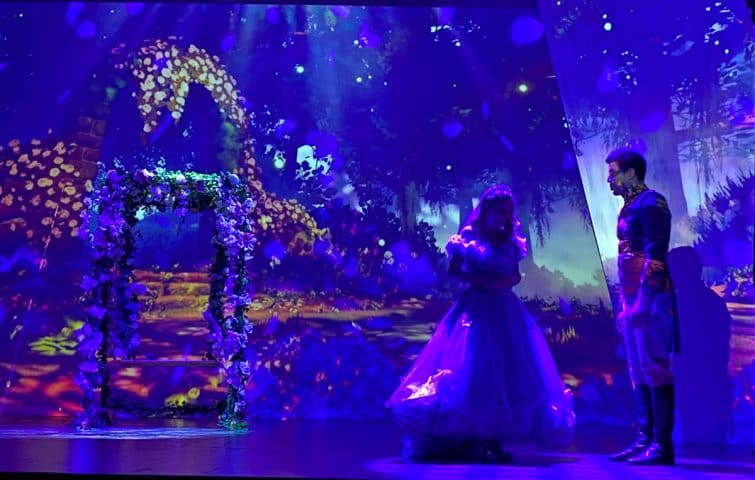
Cenușăreasa este gata de bal!O nouă premieră la Teatrul EXCELSIOR
Teatrul EXCELSIOR prezintă, vineri, 24 septembrie, ora 19:00,premiera spectacoluluiCenușăreasa– o adaptare muzicală a basmului omonim, semnată Eduard Petru Jighirgiu, cu participarea coregrafului Edi Stancu. Veți descoperi o versiune surprinzătoare a Cenușăresei, care explorează ludic fiecare personaj și detaliu al poveștii în crearea unui spectacol care va bucura întreaga familie.
Eduard Petru Jighirgiu, regizor: „Dacă reușești să pătrunzi dincolo de aparențe, poți descoperi lucruri fascinante. Unul dintre elementele importante de la care am pornit spectacolul a fost muzica. Am transformat povestea într-un musical. Atunci când am compus-o și orchestrat-o, am folosit un mix de instrumente clasice și moderne. Știu că acesta va fi unul dintre atuurile spectacolului. Este o modalitate foarte frumoasă de a aduce o poveste clasică în timpurile noastre. Apoi, am mizat foarte mult pe o trupă de actori extrem de talentați și cu o poftă de joacă nebună. Ce veți vedea pe scenă? Un spectacol care va bucura copiii de la 5 la 100 de ani!”
Edi Stancu, coregraf: „Muzica si dansul dau o notă unică și memorabilitate poveștii. Acțiunea este mai dinamică si surprizătoare în pași de dans. Am o plăcere deosebită în a lucra cu actorii Teatrului EXCELSIOR pentru că sunt foarte talentați si îndrăgostiti de munca lor. Teatrul este cel mai provocator mod de exprimare pentru că, odată spectacolul început, nu există «duble», nu se schimbă unghiul de filmare, nu există prompter, nu există moderator. Sunt doar actori în fața dumneavoastră. Veniți să vedeți musicalul «Cenușăreasa», o poveste clasică într-o abordare contemporană, pe o muzică de excepție și o coregrafie ce vă va surprinde la fiecare pas!”
Cenușăreasa, una dintre cele mai îndrăgite povești din toate timpurile, își dezvăluie farmecul pe scena Teatrului EXCELSIOR într-un spectacol care ne amintește să nu renunțăm niciodată la visurile noastre și să credem în ele cu adevărat, oricât de „imposibil” de împlinit ar părea. Uneori, fericirea poate fi mai aproape decât credeam, poate chiar la… un pantof pierdut distanță. Așadar, pregătiți-vă de bal!
Detalii despre spectacol: https://www.excelsior.info.ro/cenusareasa/. Biletele pot fi achiziționate de pe platforma bilet.ro și de la sediul Teatrului EXCELSIOR (Str. Academiei, nr. 28). Următoarea reprezentație: 26 septembrie 2021, ora 11:00.
Parteneri: Mihaela Glăvan, Aqua Carpatica
CENUȘĂREASA adaptare muzicală de Eduard Petru Jighirgiu după Charles Perrault
Distribuția:
Cenușăreasa: Alexandra Giurca | Mama: Adriana Drăguț Jighirgiu | Drizella: Oana Predescu | Anastasia: Andreea Hristu | Prințul: Alex Călin | Ministrul: Doru Bem | Regele: Radu Micu| Zâna: Ana Udroiu | Jaq: Dan Clucinschi | Gus: Mihai Mitrea | Rosy: Raluca Botez | Bob: Mircea Alexandru Băluță | Rolph: Alex Popa
Regia și muzica originală: Eduard Petru Jighirgiu | Decorul și costumele: Anca Pancu și Adina Gherghiceanu | Coregrafia: Edi Stancu | Pregătirea muzicală: Ana Cebotari | Light design: Costi Baciu și Cristian Niculescu | Video design și video mapping: Cristian Niculescu & Retina Studio | Asistent regie: Adriana Drăguț Jighirgiu
Durata: 1 oră 20 min | Recomandat: 5+
21 septembrie 2021
Accessibility
Accessibility modes
Epilepsy Safe Mode
Dampens color and removes blinks
This mode enables people with epilepsy to use the website safely by eliminating the risk of seizures that result from flashing or blinking animations and risky color combinations.
Visually Impaired Mode
Improves website's visuals
This mode adjusts the website for the convenience of users with visual impairments such as Degrading Eyesight, Tunnel Vision, Cataract, Glaucoma, and others.
Cognitive Disability Mode
Helps to focus on specific content
This mode provides different assistive options to help users with cognitive impairments such as Dyslexia, Autism, CVA, and others, to focus on the essential elements of the website more easily.
ADHD Friendly Mode
Reduces distractions and improve focus
This mode helps users with ADHD and Neurodevelopmental disorders to read, browse, and focus on the main website elements more easily while significantly reducing distractions.
Blindness Mode
Allows using the site with your screen-reader
This mode configures the website to be compatible with screen-readers such as JAWS, NVDA, VoiceOver, and TalkBack. A screen-reader is software for blind users that is installed on a computer and smartphone, and websites must be compatible with it.
Readable Experience
Content Scaling
Default
Text Magnifier
Readable Font
Dyslexia Friendly
Highlight Titles
Highlight Links
Font Sizing
Default
Line Height
Default
Letter Spacing
Default
Left Aligned
Center Aligned
Right Aligned
Visually Pleasing Experience
Dark Contrast
Light Contrast
Monochrome
High Contrast
High Saturation
Low Saturation
Adjust Text Colors
Adjust Title Colors
Adjust Background Colors
Easy Orientation
Mute Sounds
Hide Images
Virtual Keyboard
Reading Guide
Stop Animations
Reading Mask
Highlight Hover
Highlight Focus
Big Dark Cursor
Big Light Cursor
Cognitive Reading
Text to Speech
Navigation Keys
Voice Navigation
Accessibility Statement
excelsior.info.ro
5 April 2026
Compliance status
We firmly believe that the internet should be available and accessible to anyone, and are committed to providing a website that is accessible to the widest possible audience,
regardless of circumstance and ability.
To fulfill this, we aim to adhere as strictly as possible to the World Wide Web Consortium’s (W3C) Web Content Accessibility Guidelines 2.1 (WCAG 2.1) at the AA level.
These guidelines explain how to make web content accessible to people with a wide array of disabilities. Complying with those guidelines helps us ensure that the website is accessible
to all people: blind people, people with motor impairments, visual impairment, cognitive disabilities, and more.
This website utilizes various technologies that are meant to make it as accessible as possible at all times. We utilize an accessibility interface that allows persons with specific
disabilities to adjust the website’s UI (user interface) and design it to their personal needs.
Additionally, the website utilizes an AI-based application that runs in the background and optimizes its accessibility level constantly. This application remediates the website’s HTML,
adapts Its functionality and behavior for screen-readers used by the blind users, and for keyboard functions used by individuals with motor impairments.
If you’ve found a malfunction or have ideas for improvement, we’ll be happy to hear from you. You can reach out to the website’s operators by using the following email
Screen-reader and keyboard navigation
Our website implements the ARIA attributes (Accessible Rich Internet Applications) technique, alongside various different behavioral changes, to ensure blind users visiting with
screen-readers are able to read, comprehend, and enjoy the website’s functions. As soon as a user with a screen-reader enters your site, they immediately receive
a prompt to enter the Screen-Reader Profile so they can browse and operate your site effectively. Here’s how our website covers some of the most important screen-reader requirements,
alongside console screenshots of code examples:
Screen-reader optimization: we run a background process that learns the website’s components from top to bottom, to ensure ongoing compliance even when updating the website.
In this process, we provide screen-readers with meaningful data using the ARIA set of attributes. For example, we provide accurate form labels;
descriptions for actionable icons (social media icons, search icons, cart icons, etc.); validation guidance for form inputs; element roles such as buttons, menus, modal dialogues (popups),
and others. Additionally, the background process scans all the website’s images and provides an accurate and meaningful image-object-recognition-based description as an ALT (alternate text) tag
for images that are not described. It will also extract texts that are embedded within the image, using an OCR (optical character recognition) technology.
To turn on screen-reader adjustments at any time, users need only to press the Alt+1 keyboard combination. Screen-reader users also get automatic announcements to turn the Screen-reader mode on
as soon as they enter the website.
These adjustments are compatible with all popular screen readers, including JAWS and NVDA.
Keyboard navigation optimization: The background process also adjusts the website’s HTML, and adds various behaviors using JavaScript code to make the website operable by the keyboard. This includes the ability to navigate the website using the Tab and Shift+Tab keys, operate dropdowns with the arrow keys, close them with Esc, trigger buttons and links using the Enter key, navigate between radio and checkbox elements using the arrow keys, and fill them in with the Spacebar or Enter key.Additionally, keyboard users will find quick-navigation and content-skip menus, available at any time by clicking Alt+1, or as the first elements of the site while navigating with the keyboard. The background process also handles triggered popups by moving the keyboard focus towards them as soon as they appear, and not allow the focus drift outside it.
Users can also use shortcuts such as “M” (menus), “H” (headings), “F” (forms), “B” (buttons), and “G” (graphics) to jump to specific elements.
Disability profiles supported in our website
Epilepsy Safe Mode: this profile enables people with epilepsy to use the website safely by eliminating the risk of seizures that result from flashing or blinking animations and risky color combinations.
Visually Impaired Mode: this mode adjusts the website for the convenience of users with visual impairments such as Degrading Eyesight, Tunnel Vision, Cataract, Glaucoma, and others.
Cognitive Disability Mode: this mode provides different assistive options to help users with cognitive impairments such as Dyslexia, Autism, CVA, and others, to focus on the essential elements of the website more easily.
ADHD Friendly Mode: this mode helps users with ADHD and Neurodevelopmental disorders to read, browse, and focus on the main website elements more easily while significantly reducing distractions.
Blindness Mode: this mode configures the website to be compatible with screen-readers such as JAWS, NVDA, VoiceOver, and TalkBack. A screen-reader is software for blind users that is installed on a computer and smartphone, and websites must be compatible with it.
Keyboard Navigation Profile (Motor-Impaired): this profile enables motor-impaired persons to operate the website using the keyboard Tab, Shift+Tab, and the Enter keys. Users can also use shortcuts such as “M” (menus), “H” (headings), “F” (forms), “B” (buttons), and “G” (graphics) to jump to specific elements.
Additional UI, design, and readability adjustments
Font adjustments – users, can increase and decrease its size, change its family (type), adjust the spacing, alignment, line height, and more.
Color adjustments – users can select various color contrast profiles such as light, dark, inverted, and monochrome. Additionally, users can swap color schemes of titles, texts, and backgrounds, with over seven different coloring options.
Animations – person with epilepsy can stop all running animations with the click of a button. Animations controlled by the interface include videos, GIFs, and CSS flashing transitions.
Content highlighting – users can choose to emphasize important elements such as links and titles. They can also choose to highlight focused or hovered elements only.
Audio muting – users with hearing devices may experience headaches or other issues due to automatic audio playing. This option lets users mute the entire website instantly.
Cognitive disorders – we utilize a search engine that is linked to Wikipedia and Wiktionary, allowing people with cognitive disorders to decipher meanings of phrases, initials, slang, and others.
Additional functions – we provide users the option to change cursor color and size, use a printing mode, enable a virtual keyboard, and many other functions.
Browser and assistive technology compatibility
We aim to support the widest array of browsers and assistive technologies as possible, so our users can choose the best fitting tools for them, with as few limitations as possible. Therefore, we have worked very hard to be able to support all major systems that comprise over 95% of the user market share including Google Chrome, Mozilla Firefox, Apple Safari, Opera and Microsoft Edge, JAWS and NVDA (screen readers).
Notes, comments, and feedback
Despite our very best efforts to allow anybody to adjust the website to their needs. There may still be pages or sections that are not fully accessible, are in the process of becoming accessible, or are lacking an adequate technological solution to make them accessible. Still, we are continually improving our accessibility, adding, updating and improving its options and features, and developing and adopting new technologies. All this is meant to reach the optimal level of accessibility, following technological advancements. For any assistance, please reach out to
Acest site folosește cookie-uri pentru a-ți putea oferi cea mai bună experiență în utilizare. Informațiile cookie sunt stocate în navigatorul tău și au rolul de a te recunoaște când te întorci pe site-ul nostru și de a ajuta echipa noastră să înțeleagă care sunt secțiunile site-ului pe care le găsești mai interesante și mai utile.
Cookie-urile strict necesare
Cookie-urile strict necesar trebuie să fie activate tot timpul, astfel îți putem salva preferințele pentru setările cookie-urilor.
Dacă dezactivezi aceste cookie-uri, nu vom putea să-ți salvăm preferințele. Aceasta înseamnă că de fiecare dată când vizitezi acest site va trebui să activezi sau să dezactivezi cookie-urile din nou.
Cookie-uri terțe
This website uses Google Analytics to collect anonymous information such as the number of visitors to the site, and the most popular pages.
Keeping this cookie enabled helps us to improve our website.
Te rog activează mai întâi cookie-urile strict necesare ca să-ți putem salva preferințele!